For the complete Mojo documentation index, see llms.txt. Markdown versions of all pages are available by appending .md to any URL (e.g. /docs/manual/basics.md).
TileTensor layouts
The TileTensor type is a flexible abstraction for working with
multidimensional data. Every TileTensor has an associated layout
that describes how logical tensor coordinates are mapped to memory
locations. This section describes how to create and work with layouts
for TileTensor. In particular, it discusses the following types:
- The
tile_layout.Layoutstruct describes an arrangement of data in memory. A layout is a function that maps a set of logical coordinates (like (x, y) in a two-dimensional array) to a linear index value. Layouts can also describe more complex organizations, like a matrix subdivided into tiles. Coordis a tuple-like container for storing integer coordinates that supports both compile-time and run-time values. It's used for defining logical coordinates and layout shapes, among other things.
Example code and imports
You can find most of the code examples on this page in the public GitHub repo.
Some of the concepts presented here can be a little hard to grasp from static examples, so we recommend downloading the example code and experimenting.
For brevity, the code examples on this page omit imports. Many of them are also short snippets, which need to be placed inside a function to be valid Mojo code.
The following imports include all of the types and functions used on this page.
from layout import Coord, coord, Idx, print_layout
from layout.tile_layout import (
    Layout,
    blocked_product,
    col_major,
    row_major,
    zipped_divide,
)
What's a Layout?
A layout is a function that maps a set of logical coordinates to a single linear index value.
For example, a layout could describe a 2x4 row-major matrix, or a 6x6 column-major matrix.
var row_major2x4 = row_major[2, 4]()
var col_major6x6 = col_major[6, 6]()
Layouts are made up of two sets of numbers: shape and stride, where shape describes the logical coordinate space and the stride determines the mapping to the linear index value. A simple layout can be written as (shape:stride). For example, a contiguous vector of length 4 can be represented as (4:1):


A 3x4 row-major layout can be represented as ((3, 4):(4, 1)). That is, the shape is 3x4 and the strides are 4 and 1. You can break this down into two sub-layouts or modes: a row mode and a column mode: 3 rows with a stride of 4 (3:4, the first numbers from each tuple) and 4 columns with a stride of 1 (4:1, the second numbers from each tuple).
The print_layout() function
generates an ASCII diagram of any 2D layout, showing the coordinates on the
outside and the corresponding index values in the grid.
var row_major3x4 = row_major[3, 4]()
print_layout(row_major3x4.to_layout())
Output:
((3, 4):(4, 1))
       0    1    2    3
    +----+----+----+----+
 0  |  0 |  1 |  2 |  3 |
    +----+----+----+----+
 1  |  4 |  5 |  6 |  7 |
    +----+----+----+----+
 2  |  8 |  9 | 10 | 11 |
    +----+----+----+----+
The coordinate to index mapping is performed by calculating the dot product of the logical coordinates and the corresponding strides. For example, given the coordinates (i, j) and the layout shown above, the index value is $i4 + j1$. So coordinate (1, 1) maps to 5, as shown in the diagram.
The following example shows how to use a Layout to convert between coordinates
and index values.
var coords = coord[1, 1]()
var idx = row_major3x4(coords)
print("index at (1, 1): ", idx)
print("coordinates at index 7:", row_major3x4.idx2crd(7))
Output:
index at coordinates (1, 1):  5
coordinates at index 7: (1, 3)
As this example shows, the layout is a function that takes a set of integer
coordinates and returns a single integer (the linear index). The Layout struct
also provides an idx2crd()
method that transforms a linear index into a set of logical coordinates.
When you use a TileTensor, you'll use the layout to define how the data is
organized in memory, and then access data through the TileTensor interface.
You won't usually need to convert coordinates to indexes yourself. But it's
helpful to understand how it works.
Coord and Idx: representing multidimensional coordinates
Logical coordinates—and a layout's shape and size—are represented using the
Coord type, a tuple-like structure that
can hold both compile-time and run-time integer values. Each element of a
Coord is either an integer value or a nested tuple.
You can create a simple Coord with all compile-time values or all run-time
values using the coord() function:
var comptime_coords = coord[4, 4]()
var runtime_coords = coord[DType.int32]((a, b, c))
When you need to mix compile-time and run-time values, you can use the
Idx()
function to generate a compile-time or run-time integer.
comptime comptime_int = Idx[columns]()  # Compile-time int from parameter value
comptime comptime_int2 = Idx(4)  # Compile-time int from Int literal
var runtime_int = Idx(rows)  # Run-time int from dynamic value
var mixed_shape = Coord((Idx(rows), Idx[columns]()))
var mixed_layout = row_major((Idx(rows), Idx[columns]()))
You can create nested Coord values by passing nested tuples to the
constructor—either tuples of values constructed with Idx, or tuples
of Coord values:
var shape1 = Coord((Idx[6](), Idx[8]()))
var shape2 = Coord((coord[2, 2](), coord[3, 4]()))
var shape3 = Coord((shape1, shape2))
print(shape3)
((6, 8), ((2, 2), (3, 4)))
The coord package provides a number of
functions for working with Coords.
Modes
A layout has one or more modes, where a mode is a shape:stride pair. For example, the 1D vector layout (8:1) has a single mode: 8 elements with a stride of 1:


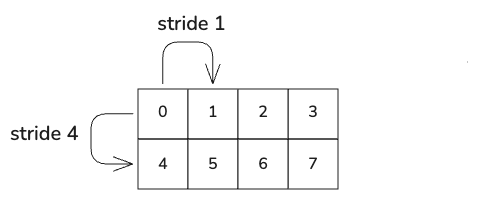
The 2D row-major matrix layout ((2, 4):(4, 1)) has two modes, 2:4 (the first numbers from each tuple) and 4:1 (the second numbers from each tuple). Taking them right to left, the second mode describes 4 columns with a stride of one. The first mode specifies that there are two of these groups with a stride of 4:
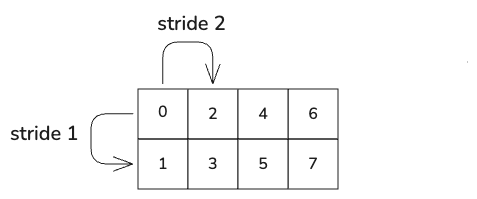
In a column-major layout, the row number varies the fastest, so a column-major 2x4 matrix has the layout ((2, 4):(1, 2)) and looks like this:
A layout's rank is the number of dimensions in its shape, which is equivalent to the number of top-level modes in the layout. A rank-1 (or 1D) layout describes a vector. A rank-2 layout describes a 2D matrix, and so on.
A layout's size is defined as the product of all of the modes in the layout's shape. To put it another way, it's the number of elements that the layout addresses: that is, the domain of the layout function.
Modes can also be nested to represent more complicated strides along a dimension. For example, the layout (8:1) represents a 1D vector of 8 elements.
The layout (((4, 2):(1, 4))) is also a 1D vector of 8 elements. The extra set of parentheses indicates a nested or hierarchical mode. Instead of being represented by a single mode like 8:1, this layout's single dimension is represented by the multi-mode (4, 2):(1, 4):
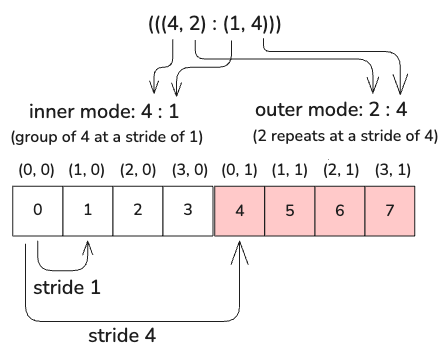
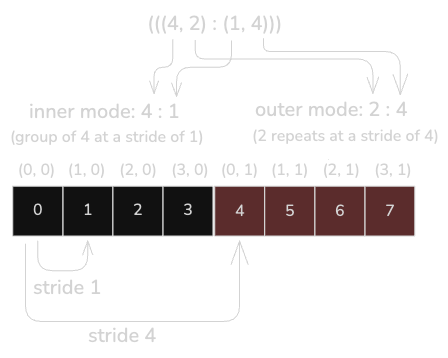
Note that in the nested modes, there's no notion of row and column. You can think of the first mode as the "inner" mode (defining a group) and the next mode as an "outer" mode (defining a repeat of the group) as shown above.
A set of nested modes (a multi-mode) counts as a single mode when considering the parent layout's rank. For example, the layouts (8:1) and (((4, 2):(1, 4))) are both 1D, or rank-1 layouts. A layout's flat rank counts the total number of modes in the layout, so (8:1) has a flat rank of 1, while (((4, 2):(1, 4))) has a flat rank of 2.
This gets more interesting when we move to two dimensions. Consider the following 2D layouts:
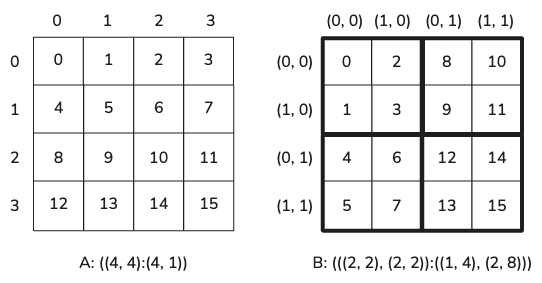
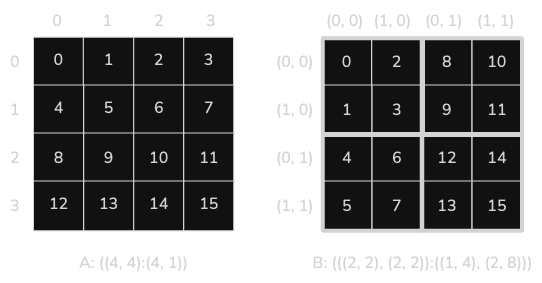
Layouts A and B are both 2D matrix layouts with the same overall 2D shape, but with the elements in a different order. Layout B is tiled, so instead of being in row-major or column-major order, four consecutive indices are grouped into each 2x2 tile. This is sometimes called tile-major order.
We can break this tiled layout into two modes, one for the rows and one for the columns:
-
Layout B has a row mode of (2, 2):(1, 4). We can further break this into two sub-modes: the inner mode, 2:1, defines a group of two rows with a stride of one. The outer mode, 2:4, specifies that the group occurs twice with a stride of 4.
-
The column has the mode (2, 2):(2, 8). Once again we can break this into two sub-modes: (2:2) defines a group of two columns with a stride of two, and the group occurs twice with a stride of 8 (2:8).
If all of those modes are swimming before your eyes, take a moment to study the figure and trace out the strides yourself.
Making layouts
There are multiple ways to create layouts. The
row_major() and
col_major() functions are
probably the simplest ways to create a layout. The row_major() function
creates a generalized row-major layout: that is, the rightmost coordinate varies
the fastest. The col_major() function creates a generalized column-major
layout, where the leftmost coordinate varies the fastest.
There are two ways to call these functions. You can either pass in a set of compile-time dimensions as variadic parameter values:
comptime row_major3d = row_major[4, 4, 4]()
comptime col_major3d = col_major[4, 4, 4]()
Or you can pass in a Coord defining the shape of the layout.
var from_coords = row_major(coord[6, 8]())
Defining a layout using Coord values lets you define both compile-time
and run-time dimensions, as discussed in the next section.
Run-time layouts
Layouts with compile-time known dimensions are more efficient, especially on GPU. However, sometimes you don't know the shape of the data—or you know the width of the data but not the number of rows.
As described in the section on Coord and Idx, you can
define a Coord using the Coord constructor or the coord() convenience
function. Using Coord, you can define layouts with all compile-time
dimensions, all run-time dimensions, or a mixture of the two.
# Layout with compile-time dimensions
comptime row_major_comptime = row_major(coord[16, 8]())

# Layout with run-time dimensions
var a, b = 4, 8
var row_major_runtime = row_major(coord[DType.int32]((a, b)))

# Mixed layout with one run-time dimension and one compile-time dimension
var row_major_mixed = row_major((Idx(rows), Idx[columns]()))
Tiled layouts
Sometimes you need a more complicated memory layout. For example, to improve the efficiency of memory accesses, you may want to load your data into memory using a tile-major layout. "tile-major" describes a layout where a the overall layout is divided into rectangular "tiles" and elements inside a tile are laid out consecutively in memory.
The following is an example of a tile-major layout:
(((3, 2), (2, 5)):((1, 6), (3, 12)))
       0    1    2    3    4    5    6    7    8    9
    +----+----+----+----+----+----+----+----+----+----+
 0  |  0 |  3 | 12 | 15 | 24 | 27 | 36 | 39 | 48 | 51 |
    +----+----+----+----+----+----+----+----+----+----+
 1  |  1 |  4 | 13 | 16 | 25 | 28 | 37 | 40 | 49 | 52 |
    +----+----+----+----+----+----+----+----+----+----+
 2  |  2 |  5 | 14 | 17 | 26 | 29 | 38 | 41 | 50 | 53 |
    +----+----+----+----+----+----+----+----+----+----+
 3  |  6 |  9 | 18 | 21 | 30 | 33 | 42 | 45 | 54 | 57 |
    +----+----+----+----+----+----+----+----+----+----+
 4  |  7 | 10 | 19 | 22 | 31 | 34 | 43 | 46 | 55 | 58 |
    +----+----+----+----+----+----+----+----+----+----+
 5  |  8 | 11 | 20 | 23 | 32 | 35 | 44 | 47 | 56 | 59 |
    +----+----+----+----+----+----+----+----+----+----+
This 6x10 tile-major is indexed vertically in 2 groups of 3 rows (3, 2) : (1, 6) and horizontally in 5 groups of 2 columns (2, 5):(3, 12).
If you know a layout's shape and strides in advance, you can create the layout
using the Layout constructor. But calculating the strides for a complicated
layout is far from intuitive.
An easier way to generate this type of tiled layout is the
blocked_product()
function. blocked_product() takes two layouts: a tile layout and a tiler
layout: essentially, every element in the tiler layout is replaced by a tile.
The following example generates the same tiled layout using blocked_product().
It also prints out the two input layouts.
def use_blocked_product():
    print("blocked product")
    # Define 3x2 tile
    var tile = col_major[3, 2]()
    # Define a 2x5 tiler
    var tiler = col_major[2, 5]()
    var blocked = blocked_product(tile, tiler)

    print("Tile:")
    print_layout(tile.to_layout())
    print("\nTiler:")
    print_layout(tiler.to_layout())
    print("\nTiled layout:")
    print_layout(blocked.to_layout())
    print()
Output:
Tile:
((3, 2):(1, 3))
      0   1
    +---+---+
 0  | 0 | 3 |
    +---+---+
 1  | 1 | 4 |
    +---+---+
 2  | 2 | 5 |
    +---+---+

Tiler:
((2, 5):(1, 2))
       0    1    2    3    4
    +----+----+----+----+----+
 0  |  0 |  2 |  4 |  6 |  8 |
    +----+----+----+----+----+
 1  |  1 |  3 |  5 |  7 |  9 |
    +----+----+----+----+----+

Tiled layout:
(((3, 2), (2, 5)):((1, 6), (3, 12)))
       0    1    2    3    4    5    6    7    8    9
    +----+----+----+----+----+----+----+----+----+----+
 0  |  0 |  3 | 12 | 15 | 24 | 27 | 36 | 39 | 48 | 51 |
    +----+----+----+----+----+----+----+----+----+----+
 1  |  1 |  4 | 13 | 16 | 25 | 28 | 37 | 40 | 49 | 52 |
    +----+----+----+----+----+----+----+----+----+----+
 2  |  2 |  5 | 14 | 17 | 26 | 29 | 38 | 41 | 50 | 53 |
    +----+----+----+----+----+----+----+----+----+----+
 3  |  6 |  9 | 18 | 21 | 30 | 33 | 42 | 45 | 54 | 57 |
    +----+----+----+----+----+----+----+----+----+----+
 4  |  7 | 10 | 19 | 22 | 31 | 34 | 43 | 46 | 55 | 58 |
    +----+----+----+----+----+----+----+----+----+----+
 5  |  8 | 11 | 20 | 23 | 32 | 35 | 44 | 47 | 56 | 59 |
    +----+----+----+----+----+----+----+----+----+----+
As you can see, blocked_product() combines two simple layouts to generate a
more complex one.
The layout produced by blocked_product() places items in the same tile
consecutively in memory. But addressing individual tiles is inconvenient.
The zipped_divide()
function, by contrast, tiles a 2D tensor such that
each column represents a tile worth of data.
var base = row_major[6, 4]()
var result = zipped_divide[coord[2, 2]()](base)
print_layout(base.to_layout())
print_layout(result.to_layout())
((6, 4):(4, 1))
       0    1    2    3
    +----+----+----+----+
 0  |  0 |  1 |  2 |  3 |
    +----+----+----+----+
 1  |  4 |  5 |  6 |  7 |
    +----+----+----+----+
 2  |  8 |  9 | 10 | 11 |
    +----+----+----+----+
 3  | 12 | 13 | 14 | 15 |
    +----+----+----+----+
 4  | 16 | 17 | 18 | 19 |
    +----+----+----+----+
 5  | 20 | 21 | 22 | 23 |
    +----+----+----+----+
(((2, 2), (3, 2)):((4, 1), (8, 2)))
       0    1    2    3    4    5
    +----+----+----+----+----+----+
 0  |  0 |  8 | 16 |  2 | 10 | 18 |
    +----+----+----+----+----+----+
 1  |  4 | 12 | 20 |  6 | 14 | 22 |
    +----+----+----+----+----+----+
 2  |  1 |  9 | 17 |  3 | 11 | 19 |
    +----+----+----+----+----+----+
 3  |  5 | 13 | 21 |  7 | 15 | 23 |
    +----+----+----+----+----+----+
Similar to blocked_product(), the first tile of the new layout consists of the
values from the top-left corner of the base layout (0, 4, 1, 5). However, in
this case, the tiled layout is reshaped so that each column holds a single tile
worth of data. This layout makes it very easy to address individual tiles of
data.
Non-contiguous layouts
All of the examples so far have been dense layouts, where all of the elements are contiguous in memory. However, layouts can also describe sparse logical arrays. For example, a (4:2) layout is a sparse 1D array:
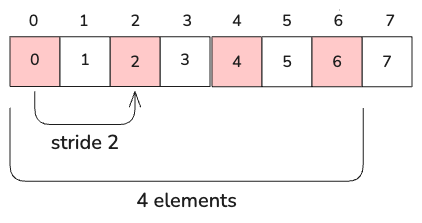
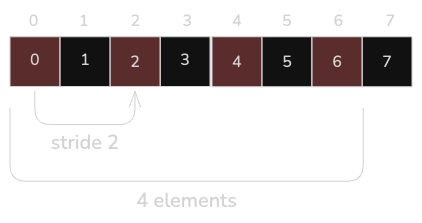
A layout's cosize is the size of the layout's codomain, which you can think of as the size of the smallest contiguous array that can contain all of the layout's elements. The cosize is the largest linear index value generated by the layout plus 1. So in the example in Figure 8, the layout has a size of 4, but a cosize of 7.
Alternate coordinates
Coordinates for layouts can be written in the same format as the shape Coord.
For example, given a layout with the shape ((2, 2), (2, 2)) shown earlier:
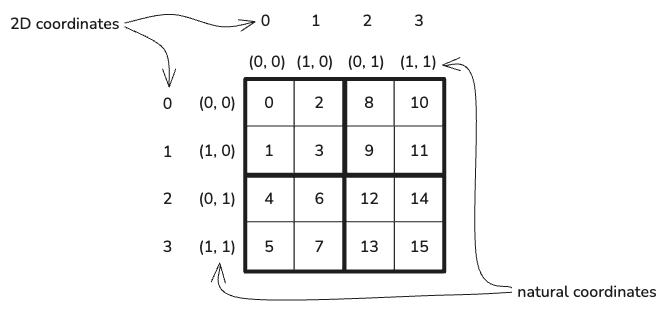
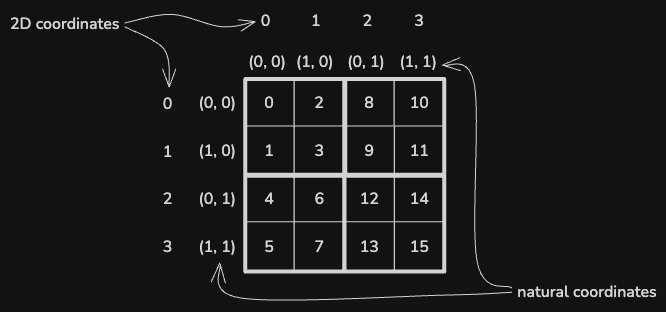
The coordinates for the layout in Figure 9 above can be written ((i, j), (k, l)). However, this layout can also be addressed as a logical 2D matrix. So ((0, 1), (0, 1)) and (2, 2) are both valid coordinates that map to the same index.
In fact, this is true for any layout: the layout can be addressed with 1D or 2D coordinates as well as its "natural" coordinates. When mapping coordinates, the dimensions are traversed in colexicographical order (that is, a generalized column-major order, where the leftmost coordinate varies fastest). Table 1 shows how different 1D and 2D coordinates map to the "natural" coordinates of the ((2, 2), (2, 2)) shape shown above:
| 1D | 2D | Natural |
|---|---|---|
| 0 | (0, 0) | ((0, 0), (0, 0)) |
| 1 | (1, 0) | ((1, 0), (0, 0)) |
| 2 | (2, 0) | ((0, 1), (0, 0)) |
| 3 | (3, 0) | ((1, 1), (0, 0)) |
| 4 | (0, 1) | ((0, 0), (1, 0)) |
| 5 | (1, 1) | ((1, 0), (1, 0)) |
| 6 | (2, 1) | ((0, 1), (1, 0)) |
| 7 | (3, 1) | ((1, 1), (1, 0)) |
| 8 | (0, 2) | ((0, 0), (0, 1)) |
| ... | ... | ... |
| 15 | (3, 3) | ((1, 1), (1, 1)) |
The layout function takes any of these coordinates and returns the linear
index value. The layout's idx2crd() method takes a linear index and returns
the natural coordinates for that index.