For the complete Mojo documentation index, see llms.txt. Markdown versions of all pages are available by appending .md to any URL (e.g. /docs/manual/basics.md).
Using TileTensor
A TileTensor
provides a view of multi-dimensional data stored in a linear
array. TileTensor abstracts the logical organization of multi-dimensional
data from its actual arrangement in memory. You can generate new tensor "views"
of the same data without copying the underlying data.
This facilitates essential patterns for writing performant computational
algorithms, such as:
- Extracting tiles (sub-tensors) from existing tensors. This is especially valuable on the GPU, allowing a thread block to load a tile into shared memory, for faster access and more efficient caching.
- Vectorizing tensors—reorganizing them into multi-element vectors for more performant memory loads and stores.
- Partitioning a tensor into thread-local fragments to distribute work across a thread block.
TileTensor is especially valuable for writing GPU kernels, and a number of
its APIs are GPU-specific. However, TileTensor can also be used for
CPU-based algorithms.
A TileTensor consists of three main properties:
- A layout, defining how the elements are laid out in memory.
- A
DType, defining the data type stored in the tensor. - A pointer to memory where the data is stored.
Figure 1 shows the relationship between the layout and the storage.
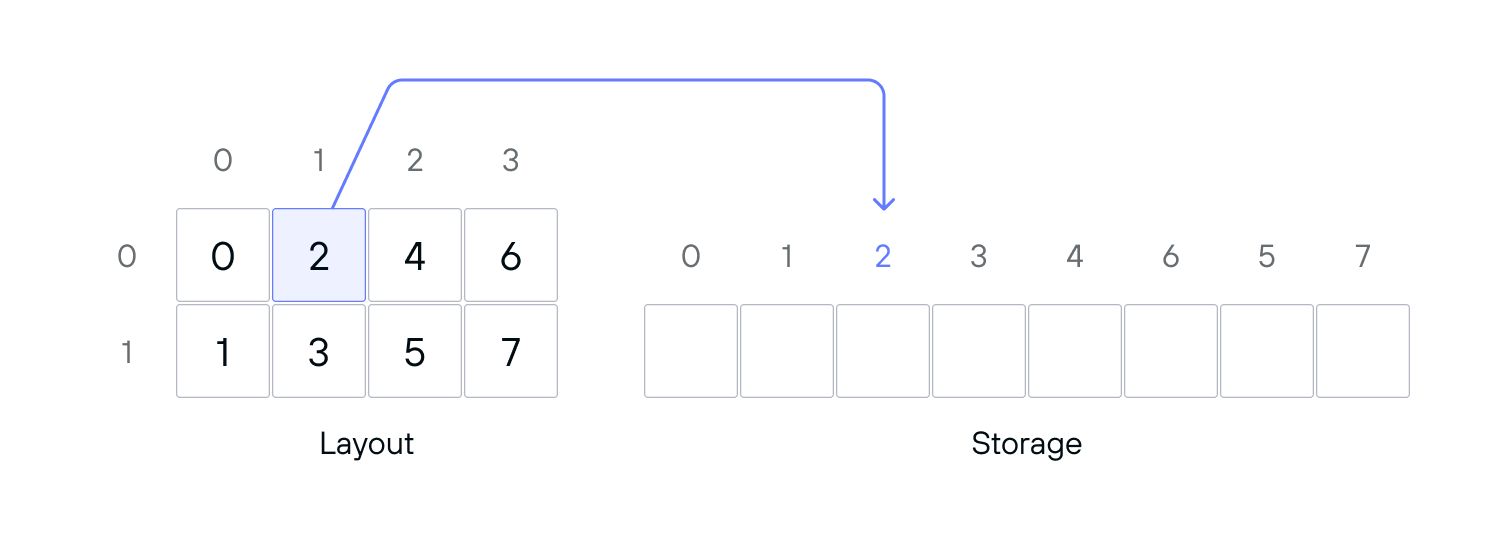
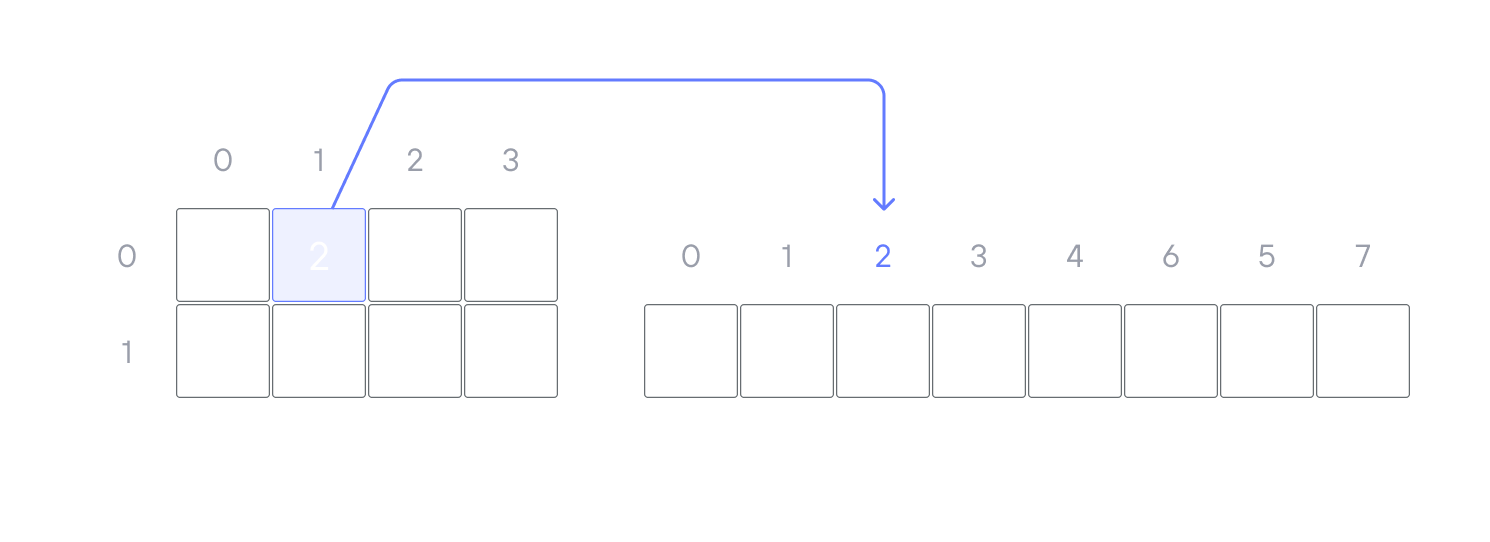
Figure 1 shows a 2D column-major layout, and the corresponding linear array of storage. The values shown inside the layout are offsets into the storage: so the coordinates (0, 1) correspond to offset 2 in the storage.
Because TileTensor is a view, creating a new tensor based on an existing
tensor doesn't require copying the underlying data. So you can easily create a
new view, representing a tile (sub-tensor), or accessing the elements in a
different order. These views all access the same data, so changing the stored
data in one view changes the data seen by all of the views.
Each element in a tensor can be either a single (scalar) value or a SIMD vector
of values. This is determined by the element_size parameter on the tensor.
For more information,
see Vectorizing tensors.
Accessing tensor elements
You can address a tile tensor like a multidimensional array to access elements:
element = tensor2d[x, y]
tensor2d[x, y] = z
The number of indices passed to the subscript operator must match the number of
coordinates required by the tensor, also known as the tensor's flat rank. For
simple layouts, this is the same as the layout's rank: two for a 2D tensor,
three for a 3D tensor, and so on. For simple coordinates, you can pass a set of
individual coordinates, as shown above. For nested coordinates, you can pass the
coordinates as a single Coord value. For an
example using nested coordinates, see the section on
Tensor indexing and nested layouts.
When you access a tensor element, the parser needs to be able to determine that you're using the correct number of coordinates. You can use compile-time assertions or constraints to guarantee that you're using the correct number of coordinates.
# Indexing into a 2D tensor requires two indices
def takes_2d(tensor2d: TileTensor[...]):
    comptime assert tensor2d.flat_rank == 2
    el0 = tensor2d[0, 0]  # Works
    # el0 = tensor2d[x]  # Compile-time error

# OR
def takes_2d_constrained(tensor2d: TileTensor[...] where tensor2d.flat_rank == 2):
    el0 = tensor2d[0, 0]
For information on using where clauses and comptime assertions, see the
section on comptime constraints.
For more complicated "nested" layouts, such as tiled layouts, the flat rank doesn't match the rank of the tensor. For details, see Tensor indexing and nested layouts.
Scalar elements and vector elements
By default, each element of a TileTensor is a single (scalar) value. But a
tensor can also be vectorized, so that each logical element of the tensor
stores a set of values. Vectorizing a tensor enables more efficient code
paths for loading and storing data.
The __getitem__() method returns a SIMD vector of elements, where the size of
the vector is equal to the element_size of the tensor (default 1). As long
as the element_size is known to be 1 at the call site, you can treat the
return value as a scalar value. For example, the following function takes a
TileTensor with element_size=1, so you can cast the element value directly
to an Int.
def takes_scalar_tensor(tensor: TileTensor[DType.int32, element_size=1, ...]) -> Int:
    comptime assert tensor.flat_rank == 2
    return Int(tensor[1, 1])
You can also access elements using the
load() and
store() methods, which
let you specify the vector size explicitly:
var elements = tensor.load[4]((Idx(row), Idx(col)))
elements = elements * 2
tensor.store((Idx(row), Idx(col)), elements)
The load() and store() methods take the indices as a Coord object.
Tensor indexing and nested layouts
A tensor's layout may have nested modes (or sub-layouts), as described in TileTensor layouts. These layouts have one or more of their dimensions divided into sub-layouts. For example, Figure 2 shows a tensor with a nested layout:
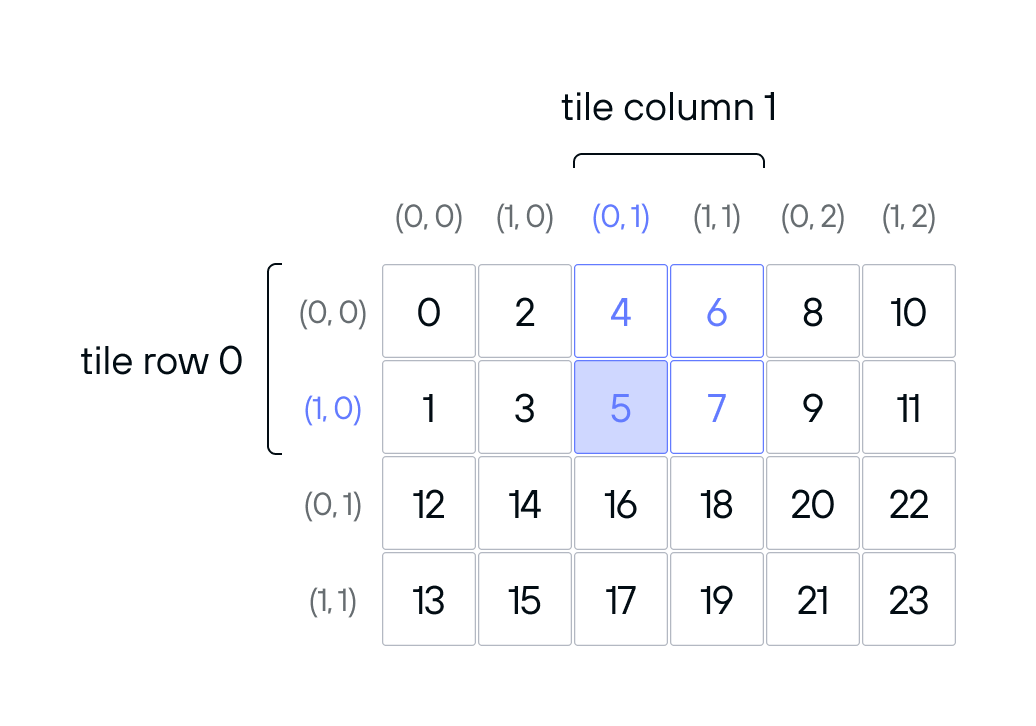
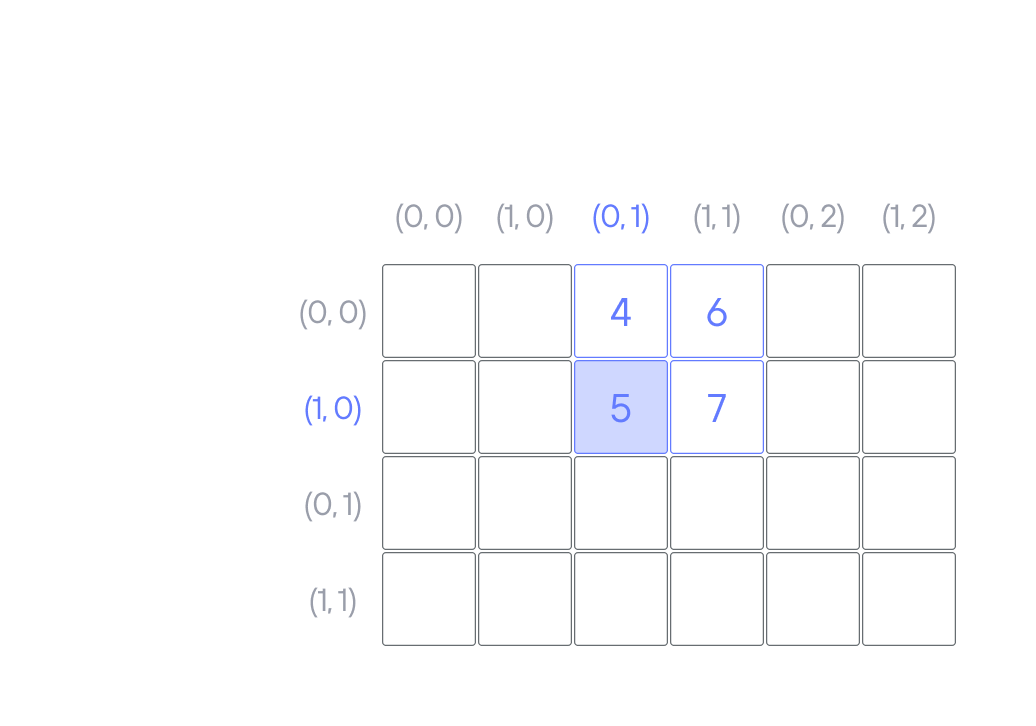
The tensor in Figure 2 has a 2D layout, but instead of being addressed with a
single coordinate on each axis, it has a pair of coordinates per axis. For
example, the coordinates ((1, 0), (0, 1)) map to the offset 6.
To access a value in a nested tensor, you can pass the nested coordinates as a
Coord struct:
var el1 = tensor[Coord(Coord(Idx(1), Idx(0)), Coord(Idx(0), Idx(1)))]
You can also pass a flattened version of the coordinates, either as a single
Coord value or by passing individual indices:
var el2 = tensor[1, 0, 0, 1]
The number of indices passed to the subscript operator must match the flat rank of the tensor. The tensor in Figure 2 has flat rank of 4, so it takes four coordinates.
You can use either nested or flat Coord values with the load() and store()
methods.
Creating a TileTensor
There are several ways to create a TileTensor, depending on where the tensor
data resides:
- On the CPU.
- In GPU global memory.
- In GPU shared or local memory.
In addition to methods for creating a tensor from scratch, TileTensor
provides a number of methods for producing a new view of an existing tensor.
Creating a TileTensor on the CPU
While TileTensor is often used on the GPU, you can also use it to create
tensors for use on the CPU.
To create a TileTensor for use on the CPU, you need a
Layout and a block
of memory to store the tensor data. A common way to allocate memory for a
TileTensor is to use an
InlineArray or a List:
comptime rows = 8
comptime columns = 16
comptime layout = row_major[rows, columns]()
var storage = InlineArray[Float32, rows * columns](fill=0.0)
var tensor = TileTensor(storage, layout)
InlineArray is a statically-sized, stack-allocated array, so it's a fast and
efficient way to allocate storage for small tensors. There are
target-dependent limits on how much memory can be allocated this way, however.
This example and the following example initialize the tensor memory to zeros.
You can also create a TileTensor using a
List.
Lists are dynamically-sized and heap allocated, so this works better for large
tensors.
comptime rows = 1024
comptime columns = 1024
comptime buf_size = rows * columns
comptime layout = row_major[rows, columns]()
var storage = List[Float32](length=buf_size, fill=0.0)
var tensor = TileTensor(storage, layout)
Creating a TileTensor on the GPU
When creating a TileTensor for use on the GPU, you need to consider which
memory space the tensor data will be stored in:
- Global memory. The GPU's largest (and slowest) memory space, global memory is the primary means of passing data into and out of the GPU.
- Shared or local memory. Shared memory is fast, on-chip memory shared by a group of threads. Local memory is specific to a single thread.
Creating a TileTensor in global memory
You must allocate global memory from the host side, by allocating a
DeviceBuffer.
On the CPU, you can construct a TileTensor using a DeviceBuffer as its
storage. Although you can create this tensor on the CPU and pass it in to a
kernel function, you can't directly modify its values on the CPU, since the
memory is on the GPU.
In both cases, if you want to initialize data for the tensor from the CPU, you
can call
enqueue_copy()
or
enqueue_memset()
on the buffer prior to invoking the kernel. The following example shows
initializing a TileTensor from the CPU and passing it to a GPU kernel.
from std.gpu import global_idx
from std.gpu.host import DeviceContext
from layout import TileTensor, stack_allocation
from layout.tile_layout import row_major

def initialize_tensor_from_cpu_example() raises:
    comptime dtype = DType.float32
    comptime rows = 32
    comptime cols = 8
    comptime block_size = 8
    comptime row_blocks = rows // block_size
    comptime col_blocks = cols // block_size
    comptime input_layout = row_major[rows, cols]()
    comptime size: Int = rows * cols

    def kernel(tensor: TileTensor[dtype, type_of(input_layout), MutAnyOrigin]):
        if global_idx.y < Int(tensor.dim[0]()) and global_idx.x < Int (
            tensor.dim[1]()
        ):
            tensor[global_idx.y, global_idx.x] = (
                tensor[global_idx.y, global_idx.x] + 1
            )

    var ctx = DeviceContext()
    var host_buf = ctx.enqueue_create_host_buffer[dtype](size)
    var dev_buf = ctx.enqueue_create_buffer[dtype](size)
    ctx.synchronize()

    var expected_values = List[Scalar[dtype]](length=size, fill=0)

    for i in range(size):
        host_buf[i] = Scalar[dtype](i)
        expected_values[i] = Scalar[dtype](i + 1)
    ctx.enqueue_copy(dev_buf, host_buf)
    var tensor = TileTensor(dev_buf, input_layout)

    ctx.enqueue_function[kernel, kernel](
        tensor,
        grid_dim=(col_blocks, row_blocks),
        block_dim=(block_size, block_size),
    )
    ctx.enqueue_copy(host_buf, dev_buf)
    ctx.synchronize()

    for i in range(rows * cols):
        if host_buf[i] != expected_values[i]:
            raise Error(
                String("Error at position {} expected {} got {}").format(
                    i, expected_values[i], host_buf[i]
                )
            )
Creating a TileTensor in shared or local memory
To create a tensor on the GPU in shared memory or local memory, use the
stack_allocation()
function from the tile_tensor module to allocate storage
in the appropriate memory space.
Both shared and local memory are very limited resources, so a common pattern is to copy a small tile of a larger tensor into shared memory or local memory to reduce memory access time.
comptime tile_layout = row_major[block_size, block_size]()
var shared_tile = stack_allocation[
    dtype, address_space=AddressSpace.SHARED
](tile_layout)
In the case of shared memory, all threads in a thread block see the same allocation. For local or register memory, each thread gets a separate allocation.
Allocating a tensor in local memory is usually an indirect way to store values
in registers. There's no way to explicitly allocate registers.
However, the compiler can promote some local memory allocations to registers. To
enable this optimization, keep the size of the tensor small, and keep all
indexing into the tensor static—for example, using comptime for loops.
Tiling tensors
A fundamental pattern for using a tile tensor is to divide the tensor into smaller tiles to achieve easier addressing, better data locality and cache efficiency. In a GPU kernel you may want to select a tile that corresponds to the size of a thread block. For example, given a 2D thread block of 16x16 threads, you could use a 16x16 tile (with each thread handling one element in the tile) or a 64x16 tile (with each thread handling 4 elements from the tensor).
Tiles are most commonly 1D or 2D. For element-wise calculations, where the output value for a given tensor element depends on only one input value, 1D tiles are easy to reason about. For calculations that involve neighboring elements, 2D tiles can help maintain data locality. For example, matrix multiplication or 2D convolution operations usually use 2D tiles.
TileTensor provides a tile() method that extracts a tile from the parent
tensor. This tile is a new TileTensor that's a view into the original tensor:
it doesn't copy any data, but shares the backing memory of the original tensor.
Tiling is useful for operations like copying a subset of a tensor between global memory and shared memory. Extracting a tile from the global tensor with the same dimensions as the shared memory tensor allows you to use the same addressing for both tensors, instead of doing a bunch of math with thread and block indexes.
Extracting a tile
The
TileTensor.tile()
method extracts a tile with a given size at a given set of coordinates.
The tile() method only works on tensors with flat (non-nested) layouts.
comptime tile_size = 32
comptime rows = 64
comptime cols = 128
comptime layout = row_major[rows, cols]()
var storage = List[Float32](capacity=rows * cols)
for i in range(rows * cols):
    storage.append(Float32(i))
var tensor = TileTensor(storage, layout)
var tile = tensor.tile[tile_size, tile_size](0, 1)
This code creates a 64x128 tensor. The tile() method treats the tensor as a
matrix of 32x32 tiles, and extracts the tile at row 0, column 1, as shown in
Figure 3.
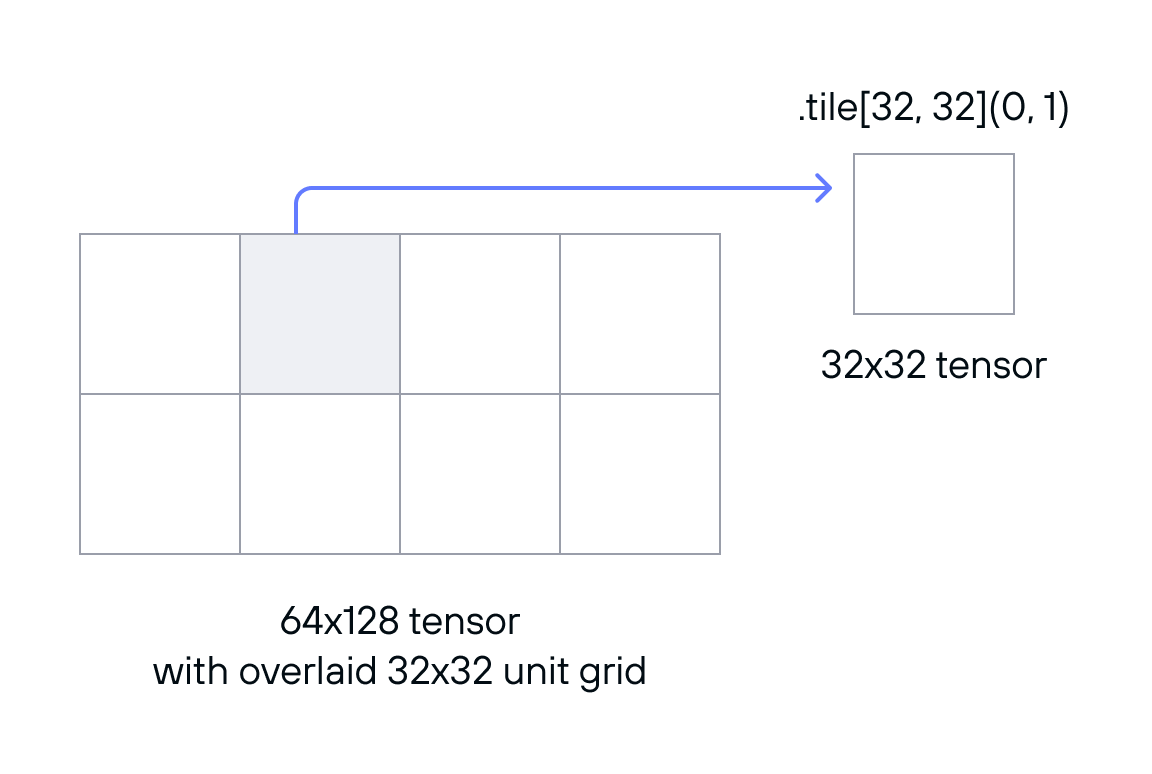
Note that the coordinates are specified in tiles.
The layout of the extracted tile depends on the layout of the parent tensor. For example, if the parent tensor has a row-major layout, as above, the extracted tile also has a row-major layout (with a stride of 1 between columns). But the stride between rows is the same as the parent's row stride.
Vectorizing tensors
When working with tensors, it's frequently efficient to access more than one value at a time. For example, having a single GPU thread calculate multiple output values ("thread coarsening") can frequently improve performance. Likewise, when copying data from one memory space to another, it's often helpful for each thread to copy a SIMD vector worth of values, instead of a single value. Many GPUs have vectorized copy instructions that can make copying more efficient.
To choose the optimum vector size, you need to know what vector operations your hardware supports for the data type you're working with. (For example, if you're working with 4 byte values on a GPU that supports 16 byte copy operations, you can use a vector width of 4.)
The vectorize()
method creates a new view of the tensor where each element of the tensor is a
vector of values.
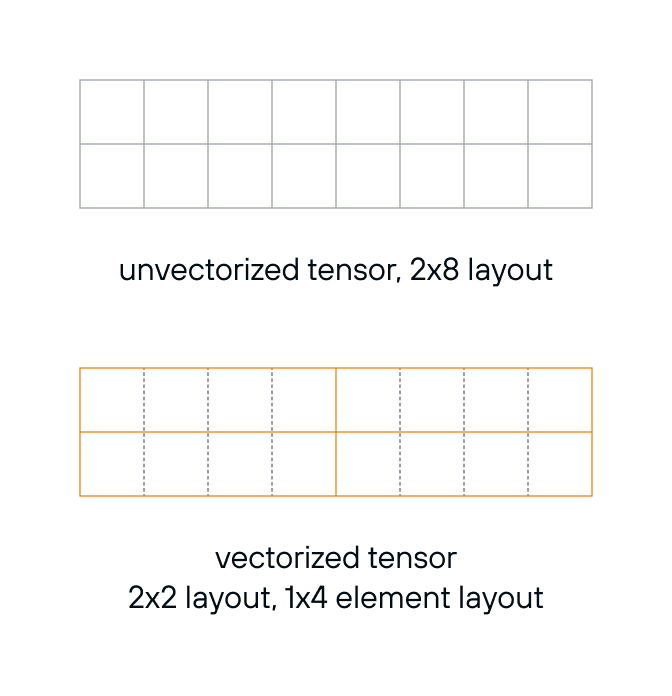
var vectorized_tensor = tensor.vectorize[1, 4]()
The vectorized tensor is a view of the original tensor, pointing to the same data. The underlying number of scalar values remains the same, but the tensor layout and element layout changes, as shown in Figure 4.
Partitioning a tensor across threads
When working with tensors on the GPU, it's sometimes desirable to distribute the
elements of a tensor across the threads in a thread block. The
distribute()
method takes a thread layout and a thread ID and returns a thread-specific
fragment of the tensor. Many of the tensor copy APIs require you to pass
in a thread layout, and call distribute() internally.
The thread layout is tiled across the tensor. The Nth thread receives a
fragment consisting of the Nth value from each tile. For example, Figure 5
shows how distribute() forms fragments given a 4x4, row-major tensor and a
2x2, column-major thread layout:
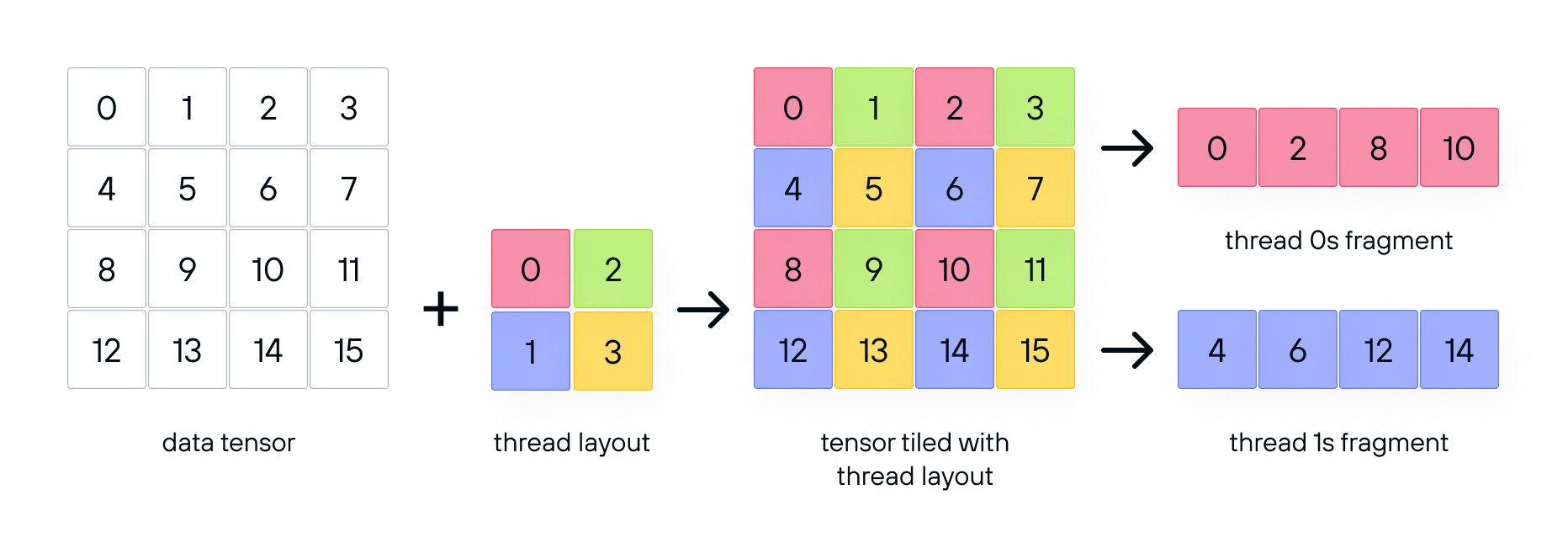
In Figure 5, the numbers in the data layout represent offsets into storage, as usual. The numbers in the thread layout represent thread IDs.
The example in Figure 5 uses a small thread layout for illustration purposes. In practice, it's usually optimal to use a thread layout size that's a multiple of the warp size of your GPU, so the work is divided across all available threads. When dividing work across multiple warps, calculate the thread's ID based on its position in the block:
var thread_id = thread_idx.z * block_dim.y * block_dim.x
            + thread_idx.y * block_dim.x + thread_idx.x
When dividing work across a single warp, you can use
lane_id() as the thread ID. Lane ID
represents a thread's ID within the warp (from 0 to WARP_SIZE - 1).
The following code vectorizes and partitions a tensor over a full warp worth of threads:
comptime simd_size = 4
comptime thread_layout = row_major[WARP_SIZE // simd_size, simd_size]()
var fragment = tile.vectorize[1, simd_size]().distribute[thread_layout](lane_id())
Given a 16x16 tile size, a warp size of 32 and a simd_size of 4, this code
produces a 16x4 tensor of 1x4 vectors. The thread layout is an 8x4 row major
layout.
Copying tensors
TileTensor provides a basic copy() method for copying tensor data. In
addition, the tile_io module provides a set of utilities specialized for
copying between various GPU memory spaces. All of the tensor copy methods
respect the layouts—so you can transform a tensor by copying it to a tensor with
a different layout (provided both layouts are the same size).
The TileTensor.copy() method copies data from a source tensor to the current
tensor, which may be in a different memory space.
This method copies data element-by-element. This method doesn't divide work
among multiple threads. If using this method on GPU, use distribute() to
create thread-specific tensor fragments for copying. Or use the thread-aware
copy methods discussed in the next section.
Depending on the tensor layout, copy() may vectorize the tensor to make the
copy more efficient. You can also vectorize() the tensor before calling
copy().
Tile copiers
The tile_io package includes a TileCopier trait and
a set of specialized tile copier structs for moving tensors between GPU memory
spaces, such as copying from shared memory to local memory. These copiers are
all thread-layout-aware: instead of passing in tensor fragments, you configure
the copier with a thread layout which it uses to partition the work.
As with the copy() method, you can use the vectorize()
method prior to copying to take advantage of vectorized copy operations.
Many of the tile copiers have very specific requirements for the shape of the copied tensor and thread layout, based on the specific GPU and data type in use.
The TileCopier trait defines a basic interface for all synchronous tile
copiers, including a copy() method that takes source and destination tensors
as arguments. By parameterizing a function on the TileCopier trait, you can
pass either one of the pre-existing tile copiers, or a custom implementation
optimized for different hardware (such as a tile copier that uses NVIDIA's
tensor memory accelerator).
The individual tile copiers are parameterized structs that provide a method for copying between different memory spaces. Each copier covers a specific path, such as copying from global memory to shared memory:
GenericToSharedTileCopierSharedToGenericTileCopierGenericToLocalTileCopierLocalToGenericTileCopierSharedToLocalTileCopierLocalToSharedTileCopier
In addition to the synchronous tile copiers, the tile_io module currently
includes one asynchronous tile copier:
This copier conforms to a separate AsyncTileCopier trait. The traits are
separate because the async tile copier has different semantics from a
synchronous tile copier.
The following example exercises the GenericToSharedAsyncTileCopier and
SharedToGenericTileCopier types.
from std.gpu import (
    thread_idx,
    block_idx,
    global_idx,
    barrier,
    WARP_SIZE,
)
from std.gpu.host import DeviceContext
from std.gpu.memory import async_copy_commit_group, async_copy_wait_all
from layout import TileTensor, stack_allocation
from layout.tile_io import GenericToSharedAsyncTileCopier, SharedToGenericTileCopier
from layout.tile_layout import row_major
from std.sys import has_accelerator


def tile_copier_example() raises:
    comptime dtype = DType.float32
    comptime rows = 128
    comptime cols = 128
    comptime block_size = 16
    comptime num_row_blocks = rows // block_size
    comptime num_col_blocks = cols // block_size
    comptime input_layout = row_major[rows, cols]()
    comptime simd_width = 4

    def kernel(
        tensor: TileTensor[dtype, type_of(input_layout), MutAnyOrigin]
    ):
        var global_tile = tensor.tile[block_size, block_size](
            Int(block_idx.y), Int(block_idx.x)
        )
        comptime tile_layout = row_major[block_size, block_size]()
        var shared_tile = stack_allocation[
            dtype, address_space=AddressSpace.SHARED
        ](tile_layout)

        comptime thread_layout = row_major[WARP_SIZE // simd_width, simd_width]()

        GenericToSharedAsyncTileCopier[thread_layout]().copy(
            shared_tile.vectorize[1, simd_width](),
            global_tile.vectorize[1, simd_width](),
        )
        async_copy_commit_group()
        async_copy_wait_all()
        barrier()

        if global_idx.y < rows and global_idx.x < cols:
            shared_tile[thread_idx.y, thread_idx.x] = (
                shared_tile[thread_idx.y, thread_idx.x] + 1
            )
        barrier()

        SharedToGenericTileCopier[thread_layout]().copy(
            global_tile.vectorize[1, simd_width](),
            shared_tile.vectorize[1, simd_width](),
        )

    var ctx = DeviceContext()
    var host_buf = ctx.enqueue_create_host_buffer[dtype](rows * cols)
    var dev_buf = ctx.enqueue_create_buffer[dtype](rows * cols)
    for i in range(rows * cols):
        host_buf[i] = Float32(i)
    var tensor = TileTensor(dev_buf, input_layout)
    ctx.enqueue_copy(dev_buf, host_buf)
    ctx.enqueue_function[kernel, kernel](
        tensor,
        grid_dim=(num_row_blocks, num_col_blocks),
        block_dim=(block_size, block_size),
    )
    ctx.enqueue_copy(host_buf, dev_buf)
    ctx.synchronize()
    for i in range(rows * cols):
        if host_buf[i] != Float32(i + 1):
            raise Error(
                String(
                    "Unexpected value ", host_buf[i], " at position ", i
                )
            )
Summary
In this document, we've explored the fundamental concepts and practical usage of
TileTensor. At its core, TileTensor provides
a powerful abstraction for working with multi-dimensional data.
By combining a layout (which defines memory organization), a data type, and a
memory pointer, TileTensor enables flexible and efficient data manipulation
without unnecessary copying of the underlying data.
We covered several essential tensor operations that form the
foundation of working with TileTensor, including creating tensors,
accessing tensor elements, and copying data between tensors.
We also covered key patterns for optimizing data access:
- Tiling tensors for data locality. Accessing tensors one tile at a time can improve cache efficiency. On the GPU, tiling can allow the threads of a thread block to share high-speed access to a subset of a tensor.
- Vectorizing tensors for more efficient data loads and stores.
- Partitioning or distributing tensors into thread-local fragments for processing.
These patterns provide the building blocks for writing efficient kernels in Mojo while maintaining clean, readable code.
To see some practical examples of TileTensor in use, see Optimize custom
ops for GPUs with Mojo.